ES LoyaltyBoost 2.9.3 release notes
These release notes cover all changes since ES Loyalty Boost 2.9.2.
What's in this release
- Boost Budget Enhancements (enhancement)
Enhancements
Boost Budget Enhancements
Overview
This enhancement increases the granularity of budget control in ES Loyalty Boost by enabling clear separation of Boost budgets from other tagged budgets, such as ES Loyalty–sourced vendor-funded allocations.
Why it's valuable
Precise budget tagging eliminates overspend and provides accurate reporting for vendor-sponsored campaigns, ensuring Boost budgets are allocated and tracked independently from other program budgets.
What it does
Marketers can now create and assign budgets directly to Boost offers, with clear tagging, reporting identifiers, and controls that distinguish between ES Loyalty and Boost allocations.
How you benefit
You gain greater financial oversight, prevent misallocation of vendor funds, and improve campaign performance tracking with streamlined budget setup and more accurate reporting.
Details
Previously, marketers could set up a budget that applied to vendor-sponsored products associated with vendor IDs. Point dispersals (attributed bonus points) were automatically allocated toward this budget. In Boost, this meant that vendor-sponsored offer templates with specified products would stop being used once the budget threshold was reached — but without clear separation between Boost and non-Boost budgets.
With this enhancement, a budget can now be set up directly for Boost offers and tagged with a "Boost" reporting ID. A filter mechanism during setup allows the budget to be designated specifically for Boost. Work was also completed to ensure Boost adheres only to budgets confirmed as Boost budgets.
How it works:
- A tag is captured during budget creation to indicate whether the budget applies to ES Loyalty or ES Loyalty Boost, and the budget is allocated accordingly.
- Boost only uses budgets that have been confirmed as Boost budgets.
- A reporting identifier is used to ensure results are reported correctly.
- Changes also include API enhancements and updates to queries and data operations.
Budget creation page controls:
New controls have been added to the Budget creation page to support assignment of a budget to ES Loyalty or Boost:
- A selector lets you choose All or Specific Offers.
- If Specific Offers is selected, a scrollable Reporting Identifier(s) checklist appears, allowing you to optionally select one or more existing reporting identifiers to associate with the budget.
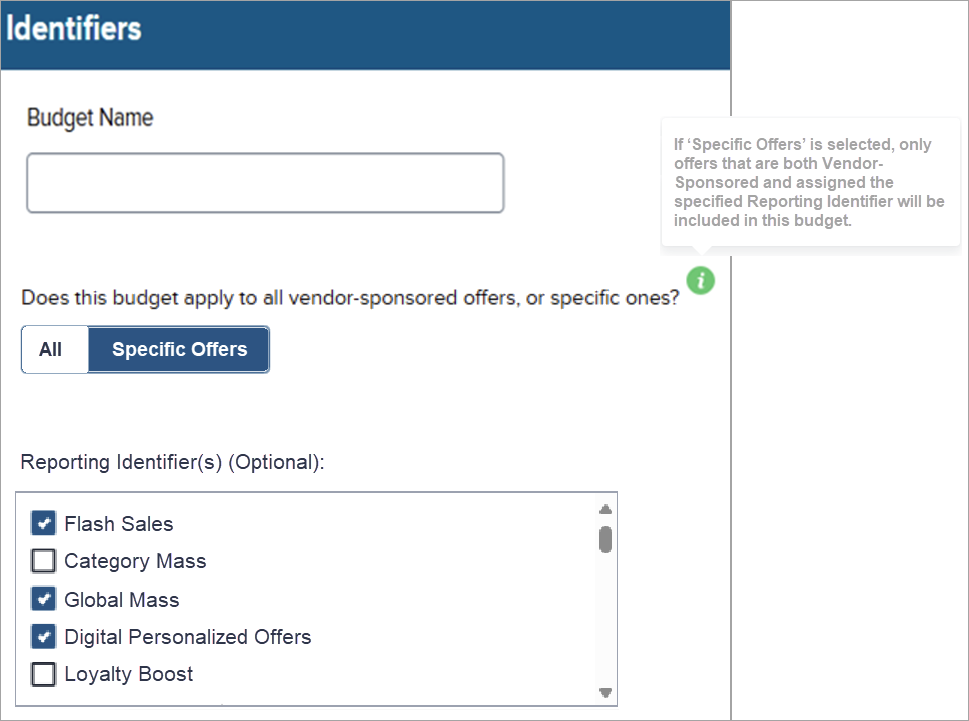
If Specific Offers is selected, only offers that are both vendor-sponsored and assigned the specified reporting identifier are included in the budget.