Gamification (Cataboom™) Business User's Guide
Presented by Exchange Solutions | September 19, 2025
This section reflects the previous release and will be updated soon. If you need to use this feature before documentation is updated, please reach out to your Client Success Representative or Technical Solutions Architect.
The value of CataBoom™ game engine integration
CataBoom™ is a gamification and rewards platform that helps brands engage customers by turning interactions into game-like experiences. Its core capabilities include:
Gamified engagement: Provides a library of ready-to-use game templates (spins, scratch cards, match games, trivia, and more) that can be customized with a brand's look and feel. It is designed to capture customer attention through short, interactive experiences that drive repeat visits and higher engagement.
Incentives and rewards: Integrates with loyalty programs, coupons, or digital offers so players can instantly win rewards. Supports a range of incentives such as discounts, points, prizes, sweepstakes entries, or branded content unlocks.
Campaign management: Marketers can quickly launch gamified promotions without heavy development resources. CataBoom includes tools for scheduling, targeting, and rules (for example, frequency caps, prize logic, and time-based events).
Data collection and insights: Collects first-party data from participants (email, preferences, and engagement behavior). Offers analytics dashboards so brands can measure campaign performance, customer engagement, and conversion.
Integrations: CataBoom can connect with CRM, loyalty, and marketing automation platforms to push earned rewards or collected data into existing ecosystems.
By integrating with CataBoom, Exchange Solutions offers its clients the benefits of well-crafted gameplay within a loyalty program, including:
- Increases in social engagement, site engagement (measured by web traffic and return-to-site rates), brand awareness, and loyalty redemption rates
- Increased location loyalty—for example, a fuel and convenience retailer can encourage members to continue patronizing their location in a competitive market by offering rewards
- Lower member acquisition costs, because gameplay can serve as an incentive to join the loyalty program
- Higher member satisfaction and lower member churn
Overview of ES Loyalty integration with CataBoom
The promotion engine in ES Loyalty™ evaluates offer types for standard transactions and activities and awards gameplay for those that require it.
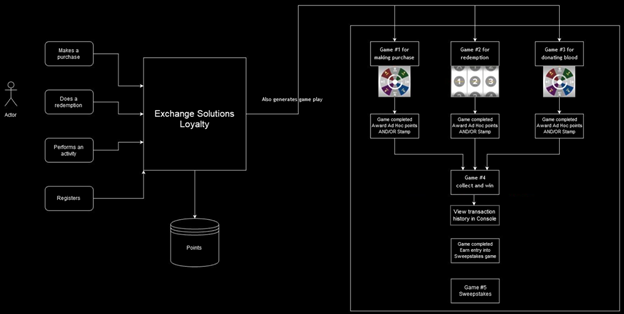
Exchange Solutions currently supports the following game types in CataBoom. These game types interact with Exchange Solutions to provide game links and update points:
| # | Game type | Description |
|---|---|---|
| 1 | Scratch Off | Click or scratch an area on the game card to reveal a reward. |
| 2 | Slot Machine | Spin the reels to win rewards. |
| 3 | Spin the Wheel | Spin a wheel to land on a reward. |
| 4 | Quick Play | Streamlined, rapid interactive experiences with instant gratification elements. |
Other game types—such as Collect and Win and Sweepstakes—are managed entirely in CataBoom. On game completion, data is sent from CataBoom via an API to an ES Loyalty endpoint, resulting in bonus points awarded to the member through an Ad Hoc Reward transaction.
Games are configured in both CataBoom and ES Loyalty. Multiple gameplay variants can exist for the same game type. For example:
- Spin the Wheel – with punch card – rewards: 1,000 to 5,000 points
- Spin the Wheel – with punch card – rewards: 2,000 to 10,000 points
- Spin the Wheel – without punch card – rewards: 1,000 to 5,000 points
- Spin the Wheel – without punch card – rewards: 2,000 to 10,000 points
An API gathers data about earned gameplay and provides the member with the appropriate URL for playing a game. Gameplay URLs can also be delivered through email triggers or a data sync with the Email Service Provider (ESP).
Important: Once a gameplay has been earned, it cannot be reversed through an adjustment. Because the member may have already played the game and earned a reward in CataBoom, the reward persists once it is issued.
Features of CataBoom integration
This section outlines the features used to integrate CataBoom as a partner within ES Loyalty. The integration allows users to earn and redeem gameplay rewards through campaigns managed by CataBoom.
CataBoom / ES Loyalty basic integration functions
-
GAMEPLAYconfiguration: Exchange Solutions has a native integration point namedGAMEPLAYused to integrate with gamification providers like CataBoom. Rewards are provided as Non-Point Rewards, so this is also enabled in the configuration. CataBoom has been added to the partner configuration as a non-financial partner, and applicable game types are included in the configuration. -
Extended Member Data (EMD) source for gamification: All clients integrating ES Loyalty with CataBoom must add this EMD.
-
Gameplay consent attribute: Exchange Solutions has a native configurable attribute flag for gameplay consent. Only members who have consented to the Terms and Conditions of gameplay can be targeted for an offer.
-
Gameplay currency initial value: When currency is set to Gameplay, the initial reward value in ES Loyalty is zero. This is because the member is rewarded with a chance to play a game in CataBoom, and it is that game that returns a response and triggers an Ad Hoc Reward for the member.
Management features in the Console
The Exchange Solutions Console includes game management features that provide control over aspects of gameplay. Access is managed at the role level through VIEW_GAMES and MANAGE_GAMES permissions.
The Games page table displays all created games with the following fields:
| Field | Description |
|---|---|
| Game ID | The unique identifier for the game (referred to as the Campaign Name in CataBoom). |
| Type | The game type (for example, Spin the Wheel). |
| Game Status | Draft or Published. |
| Market Status | Active or Inactive. |
| Created By | The name of the agent who created the game. |
| Created On | The timestamp for when the game was created. |
Each game record includes an Action menu with options to Edit, Delete, or Enable/Disable the game.
The game creation page shows the Business Unit (if applicable), Game ID, Provider (CataBoom), Type, Label, and a description. The JWT is included to allow access to the game in CataBoom.
The game Label is used in the Game dropdown menu when creating or editing an offer that rewards a gameplay, using an Active and Published game. Targeting must be set to members who have consented to the Terms and Conditions of playing the games (optional for clients).
Game settings can be viewed within an offer using the Preview button on the bottom toolbar, and are also included in offer exports.
Gameplay transactions for a member are available from the member details page under the Transactions tab. This includes transactions such as the related Ad Hoc Reward that captures game rules consent, and the Finalize transaction that awards the points.
APIs ensure rewards on game completion: Exchange Solutions API suites support game platform integration. Point of Sales (POS) and Customer User Experience (CUX) APIs support the member in receiving rewards earned in ES Loyalty. Once a member has qualified in CataBoom, the resulting bonus points are issued as an Ad Hoc Reward.
Note: Only one gameplay per offer in a single transaction is allowed. The offer code, transaction ID, and account ID are used to build a dynamic token for the gameplay URL, and this token must be unique. Transaction limits must be set to
1.
Logging and reporting
Logging and audits: Logging of transactions, API calls, and responses is performed automatically. Transactions related to gameplay have a full audit trail.
Reporting: Reports include how many gameplays were distributed to members, how many reward points were awarded from games, and which gameplay resulted in those points through Ad Hoc Rewards. To support reporting, the following data is required from Ad Hoc Reward transactions:
- Original transaction ID
- Offer code
- Gameplay ID
The Partner Ad Hoc Reward API can also receive the EMD containing these attributes.
Example use cases that are supported
The following use cases are supported by the ES Loyalty and CataBoom integration:
- Purchase X liters of fuel in a single transaction and receive gameplay as a reward.
- Single behavior offer that results in gameplay being awarded. For example:
- Purchase $10 of fuel at the pump and receive one gameplay through one offer.
- Purchase $20 in the convenience store and receive one gameplay through a second offer.
- Perform a Redemption (POS-based redemption transaction only) and receive gameplay as a reward.
Setting up CataBoom integration
CataBoom integration is carried out by Exchange Solutions' TSA team members, who configure CataBoom game mechanics along with the required webhooks so that loyalty members who earn gameplay receive bonus points reflected in the loyalty member console.
Prerequisites:
- The client must have a CataBoom instance configured.
- The TSA must have an Admin role assigned to carry out their tasks.
- The TSA must have access to Link Configuration to provide the correct links to members.
Once these prerequisites are met, the TSA carries out the following tasks:
- Configure an authentication webhook: To allow automatic generation of the required token.
- Configure a partner reward webhook: If a client partner is included in the program.
- Configure supported CataBoom games: Currently, Scratch Off, Slots, Spin the Wheel, and Quick Play are supported.
- Set up the game webhook trigger: To ensure that members who play games and earn points have their points added to their loyalty member account.
- Set up game configuration in the Exchange Solutions Console: To enable management of gameplay features and transaction tracking.
For more information, see the Exchange Solutions CataBoom Integration Guide.
Conclusion – Gamification to increase loyalty
CataBoom provides top-of-class gaming experiences integrated with the powerful features of ES Loyalty. Loyalty program members enjoy having games as part of the loyalty experience. Games increase excitement around products and brands, drive member engagement, and reduce churn. In sectors such as fuel and convenience sales, games help encourage location loyalty, repeat business, and increased transaction value. Gamification delivers compelling marketing benefits to clients and helps them stand out from competitors.
Appendix 1 – Gameplay acquisition and engagement streams
Clients want their customers to interact with their loyalty program through gamification, primarily through individual gameplays. However, the reasons a client might want customers to engage with gameplay can vary. The underlying objectives—whether attracting new members or deepening engagement with existing ones—can be organized into distinct streams:
| Stream | Purpose |
|---|---|
| Acquisition | Encourages non-members to enroll in the loyalty program by offering a chance to earn rewards through gameplay. |
| Engagement | Motivates existing loyalty members to complete offer behaviors in exchange for a points reward via gameplay. |
Acquisition stream
Non-members must be enrolled before they can play a game. To encourage non-members to enroll, the following methods are used:
- In-store advertising: A QR code with an embedded public game URL.
- Web app or in-app game advertisement: A clickable banner or hyperlink that redirects the non-member to the public game page.
In both cases, the entry point for enrollment is through a CataBoom game, which involves the following steps:
- The customer provides an email address within the game.
- The game mechanics perform a member lookup.
If the customer is not yet enrolled as a loyalty member, there are two possible enrollment paths:
Enrollment Path 1 – The customer is directed to an external client member registration site:
This path applies when the client requires customers to register through their own loyalty program website, for example to enforce processes or restrictions such as two-factor authentication.
- After the customer verifies their email, they become a loyalty program member and can return to the game page or receive an email containing the gameplay URL. This will be a copy of the engagement game.
- The new member enters their email address and is then allowed to play the game.
Enrollment Path 2 – A loyalty account is created within ES Loyalty:
- The member is directed to the gameplay page.
- The new member is required to re-enter their email address to confirm membership before being allowed to play the game.
Engagement stream
Providing gameplay as a reward engages existing members, giving them both a reason to participate in the loyalty program and an opportunity to win. To reach existing members, marketers create an offer that rewards gameplay through the Promotion UI in the ES Loyalty Console. Registered members can then receive marketing emails containing gameplay offers. For example: Purchase 20L of fuel and win a chance to get 25,000 points!
Once loyalty members are aware of these gameplay offers and complete the required behavior, they receive the gameplay URL and can access the game and win points. The flow is as follows:
- Once a member fulfills the required behavior for a gameplay offer, they receive an email containing the game URL.
- The game opens in the app, provisioned through the CUX API.
Gameplay email (triggered email)
A triggered email is sent when a member performs the required behavior that qualifies them for a gameplay reward.
Gameplay retrieved through an external app or website (via CUX API)
- Members can also retrieve earned gameplay through the mobile app or their loyalty program website.
- This requires client developers to interact with the ES Loyalty API to retrieve the earned gameplay and display it on their member portal.
Member interacting with gameplay
- After receiving the gameplay URL, the member can click the link and be directed to the gameplay page, hosted by CataBoom.
- The member can then play the game. If they win points, the points are deposited into their loyalty account balance.
Note: gameplay email (engagement objective)
- The gameplay email is intended for the recipient member to play.
- The gameplay URL must be configured so that it is playable only once. This setting resides within CataBoom's game administration console.
- If the recipient shares the email with another person, any points earned from the gameplay are still attributed to the original email recipient.